

Clinical case reviews are the bread and butter of your portfolio - here’s everything you need to know.
Of all the entries in your FourteenFish portfolio, Clinical Case Reviews (CCRs) are one of the most important... and probably the most time-consuming. You’ll need 36 per training year, which equates to about 3 per month.
But with ARCP often taking place in early July, the real pace is closer to 1 per week from the start of the academic year.
This article walks you through:
From the Portfolio tab, click on Clinical Case Reviews - it’s the first option under "Learning Logs". Click New Clinical Case Review to begin.
You’ll now see a screen with multiple sections to complete:
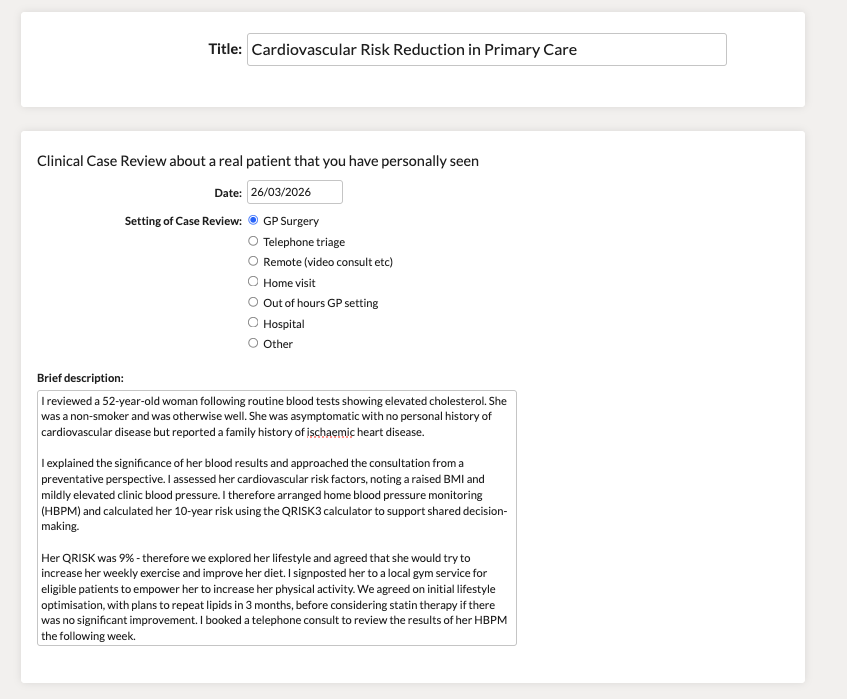
A short, descriptive summary. E.g. “Safeguarding concerns in a child”, “Tired all the time” etc.
Add the date of the clinical encounter and choose the setting (e.g. GP surgery, hospital, home visit).
This is the factual part of the case.
💡 Tip: Keep this bit relatively concise. You’ll reflect later.
Example: This is an entirely fictional case used to demonstrate how to complete a CCR.
Next, you’ll be asked to select Clinical Experience Groups — there are 9 total. Choose the ones relevant to your case.
Example:
🔁 You can link one CCR to one, or multiple CEGs.
In the example case above, I linked this to: Population Health and health promotion (including people with non-acute and/or non-chronic health problems)
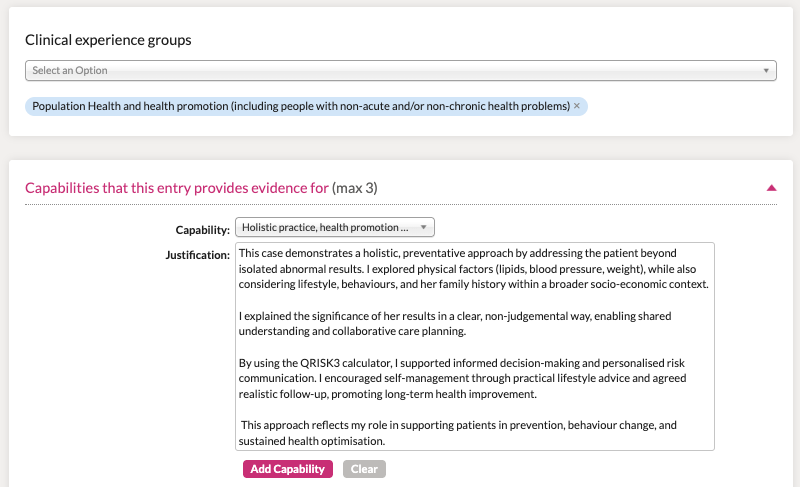
This section asks you to select up to 3 capabilities your CCR demonstrates.
There are 13 capabilities in total — covering everything from diagnostic skills to team working, communication, and ethical practice. Essentially, skills you need to be a ‘capable’ GP.
🎯 Aim for 2–3 per CCR.
💡💡 Top tip:
When selecting a capability, click “Show word descriptors” beneath it. This reveals descriptions of what it looks like to perform at different levels:
📌 Use the “competent” or “excellent” descriptors to guide your justification section. Mirror their language and include key points — it not only helps your supervisor sign off capabilities more easily at the ESR, but also gives you a clear framework to work from, making the whole process quicker and a little less painful.
This is arguably the most important part of the Clinical Case Review. Your supervisor isn’t looking for perfect medicine — they’re looking for insight, self-awareness, and progression.
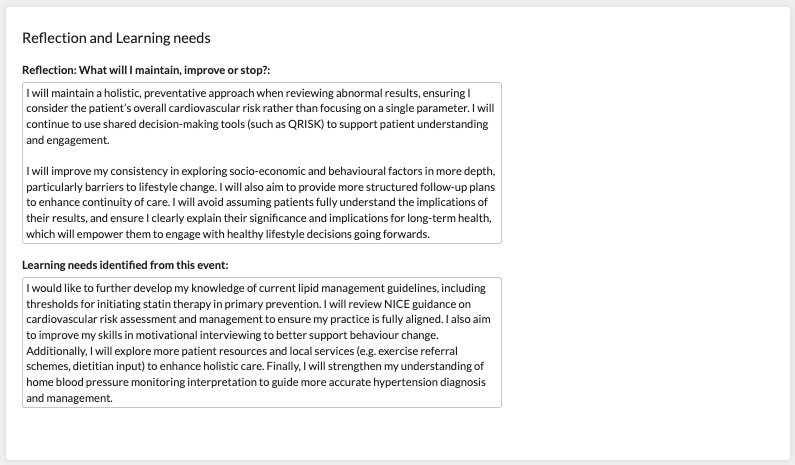
Break it down into two parts and answer the question ‘What will I maintain, improve or stop?’
Here’s how to think about each part:
What went well - and what will you keep doing?
Examples:
💡 Tip: Think about communication, professionalism, teamwork, and clinical judgement — not just the outcome.
Where could things have gone better — and how will you improve?
Examples:
💡 Tip: This isn’t about criticising yourself — it’s about showing insight and awareness.
What will you avoid doing in future?
Examples:
📌 Use this framework to keep your reflections focused — and easier for your supervisor to assess.
Mention any clinical or non-clinical gaps you identified, and how you plan to address them.
Examples:
💡 Tip: Link your learning need to a PDP item if it’s a priority — and come back later to reflect on progress.
At the bottom you’ll see an “Attach Files” button. This is optional - you can use it if you referred to a specific guideline, flowchart, or useful resource. But you don’t have to..
Click the pink Save button. If all boxes are complete, you’ll then be able to send it to your supervisor for review.
In most placements, CCRs should be reviewed by your Educational Supervisor, not your Clinical Supervisor — but double check locally.
Once saved, you’ll see icons at the top of the screen. These let you:
Back on your Portfolio homepage, if you’ve done everything right, you’ll see some of those white circles on the CEG and Capability charts start to turn green.
This means your CCR has been mapped successfully.
You’ll need to complete 36 Clinical Case Reviews per year — that’s around 3 per month, or roughly 1 per week if you factor in early ARCP deadlines.
It might feel like a box-ticking exercise at first, but CCRs can genuinely help you track your progress, reflect on your decision-making, and build confidence in common (and not-so-common) cases.
Once you get into the habit and find a workflow that works for you, they become much easier.
Check out our guide to Curriculum Coverage: Capabilities & CEGs and how to map them properly.