

If you’re just starting GP training, one of the first things you’ll come across is FourteenFish - your portfolio for tracking progress and demonstrating competence. At first, FourteenFish can feel very overwhelming.
This article is your big-picture guide - we'll explain how it all fits together, and what actually matters. Don’t get too bogged down on the specifics of each section here, this is your starting point. We’ll dive into each section in more depth later - for now, focus on getting a feel for how the portfolio works and how it all fits together.
Feel free to open up FourteenFish and login on another screen so you can orientate yourself whilst we take you through the various sections.
FourteenFish is where GP registrars demonstrate progress through training. It's your portfolioto demonstrate what you've learnt throughout the year, and that you've reached the competencies required to progress to the next year of training.
Inside fourteenfish, navigate to the 'Portfolio' tab in the top navigation bar - this is where all your learning, development and reviews live. And that’s where we will focus this article. If you've done F1 & F2, it's very similar to Horus, but adapted for GP training.
This is where you’ll log your day-to-day learning. The most common entry type is the Clinical Case Review (CCR) - a structured reflection on a case/patient you’ve seen or a clinical encounter you’ve had.
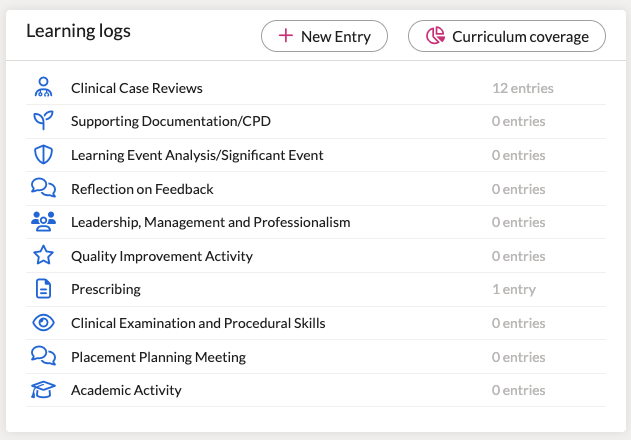
Other important learning logs include:
👉 You’ll spend a lot of time working on learning logs, especially CCRs.
We’ll break down everything you need to know about CCRs in a separate article.
This section helps you prepare for your Educational Supervisor Review (ESR) - a formal review that happens at the end of each year (with an interim ESR mid-year). You'll have 1 at the end of ST1, ST2 and finally ST3.
The most important elements of your ESR prep include demonstrating:
Every time you do a learning log or assessment you'll link it to 1 or 2 capabilities and a clinical experience group.
After linking your evidence (e.g. CCR) to a capability, one of the white dots will turn green/grey.
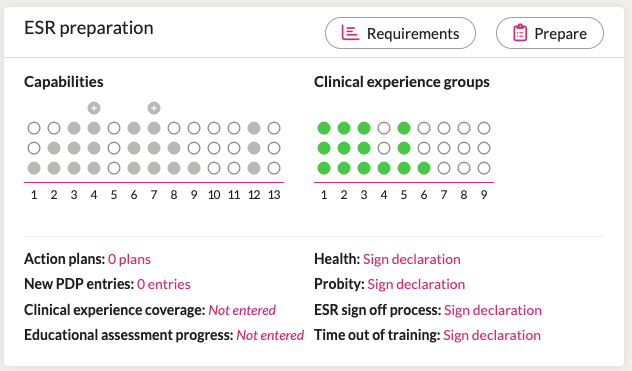
🟢 As you upload more and more evidence to your portfolio and map it to a relevant capability & CEG, each of those white dots will turn green.
By the end of the year and in time for your ESR, you should have mapped evidence to all capabilities and CEGs so that all the dots are green - this demonstrates competence in that clinical capability (e.g. Communication skills) or experience in that CEG (e.g. Mental health)
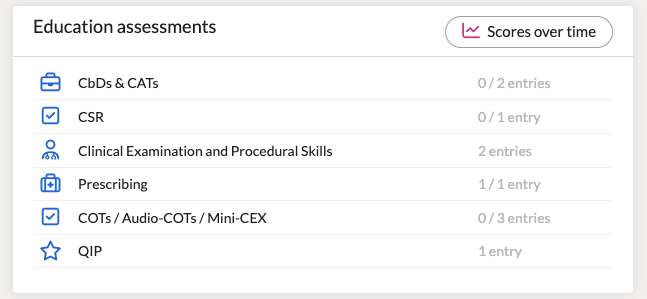
Alongside learning logs, you’ll complete structured assessments throughout your training. You must complete a mandatory number of these each year. The main types are:
For more detail, have a look at our more in-depth reviews of the most important assessments.
Also here:
You’ll be dipping into this section throughout each placement and year. Make sure you hit the mandatory numbers for each.
There’s a full list of mandatory and optional CEPS. These can be signed off at any time in training - just make sure you get all 6 essentials done before CCT.
The mandatory examinations include:
The RCGP also specifies that you should demonstrate engagement with the non-mandatory CEPS throughout your training.
A place to upload your tick-box admin, but essential for passing your ARCP.
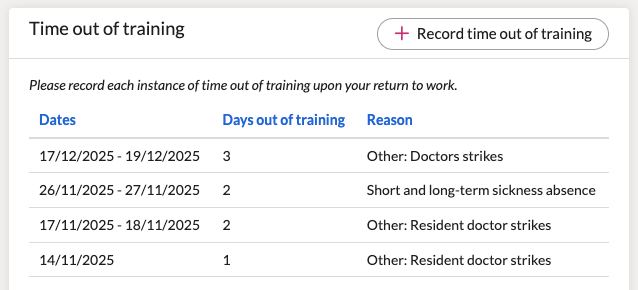
Make sure you accurately record time out of training here (TOOT). This can be cross referenced to your ESR, so don’t forget to include any sick leave, parental leave, unpaid leave (compassionate) or other (e.g. BMA Strikes).
This sidebar includes:
Your portfolio can feel overwhelming at first - but once you’ve explored the layout and logged a few cases, it starts to make sense.
You don’t need to master everything straight away. Focus on the core areas below and build gradually as you go.
Here’s what we suggest you focus on in your first few months:
✅ Get your meetings booked in - e.g. placement planning meeting
✅ Get comfortable with Clinical Case Reviews
✅ Start logging CBDs and mini-CEXs in hospital, or COTs in GP
✅ Remember to map your logs to capabilities and CEGs properly
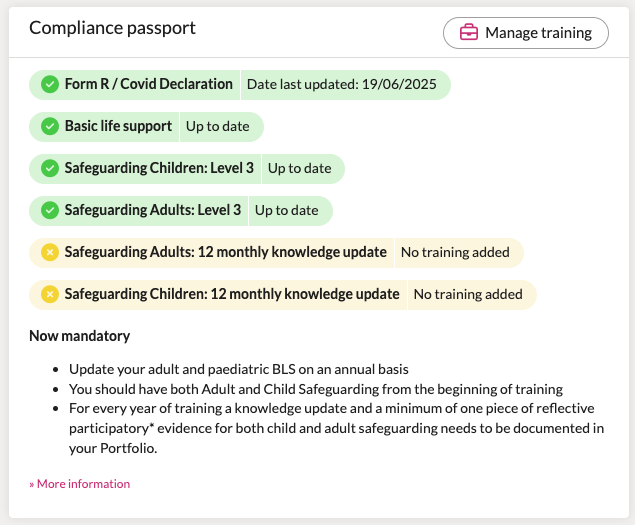
✅ Complete your mandatory training (e.g. safeguarding) early and upload it to your compliance passport.